Core Concepts
Forms and Field Mapping
Forge Forms let you collect custom information from registrants during checkout. By default, answers are written to a Form Submission record in Salesforce; individual questions can additionally be mapped to write directly to a field on Contact, Lead, Account, or Attendee. Either way, answers are written to Salesforce immediately and are never stored in Forge's own database.
How forms work
A Form is a Salesforce record (conference360__Form__c) that contains one or more Form Elements (conference360__Form_Element__c). Each Form Element is a question that maps to a specific Salesforce object and field. When a registrant submits the form, Forge writes the answer to the mapped Salesforce field — for example, mapping a "Dietary Restrictions" question to a custom field on the Contact record. The standard attendee details (Full Name, Email, Phone, Company, Title, Salutation, Address, Country, Account Postal Code, Dietary Preference) are set to Hidden, Optional or Required on each ticket, not added as form questions, and new forms start empty.
| Forge | SF Object | SF Field |
|---|---|---|
| Form | conference360__Form__c | Name, conference360__Type__c |
| Form question / element | conference360__Form_Element__c | Name, conference360__Maps_To_Object__c, conference360__Maps_To_Field__c |
| Linked event | conference360__Form__c | conference360__Event__c |
Field mapping
When you add a question to a form, you specify:
- Label — the text the registrant sees.
- Type — text, textarea, dropdown, checkbox, date, etc. Each type shows the same settings as the Salesforce form builder: text-style and Hidden questions take a default value (a Hidden question submits it as the answer), a dropdown's default is picked from its options, a Divider has only a label, Hidden and UTM questions have no Required or Help, and File Upload maps to an object only. A UTM question's label must be the URL parameter it reads, such as utm_source. A Big List question shows options from a big list group: type the options and Forge creates a group named after the question when the form saves, or search your groups and pick one.
- Maps to Object — the Salesforce object the answer is written to (Attendee, Contact, Account or Lead). The field picker lists readable fields by label and hides fields you cannot edit.
- Maps to Field — the specific Salesforce field on that object. The list offers only the field types the Salesforce form builder allows for the question type (for example, a Text question can't map to a picklist such as Registration Status). A question left at None stays unmapped. If a saved mapping no longer fits the question type, the question shows as not mapped and keeps its saved value until you choose a field.
- Required — whether the registrant must answer the question before completing registration.
- Visibility conditions — show or hide the question based on answers to earlier questions. Any question that has an earlier question can be given conditions from its Conditions button, not only follow-ups. The conditional options panel is collapsed by default and shows a count badge when the question has conditions.
Form types
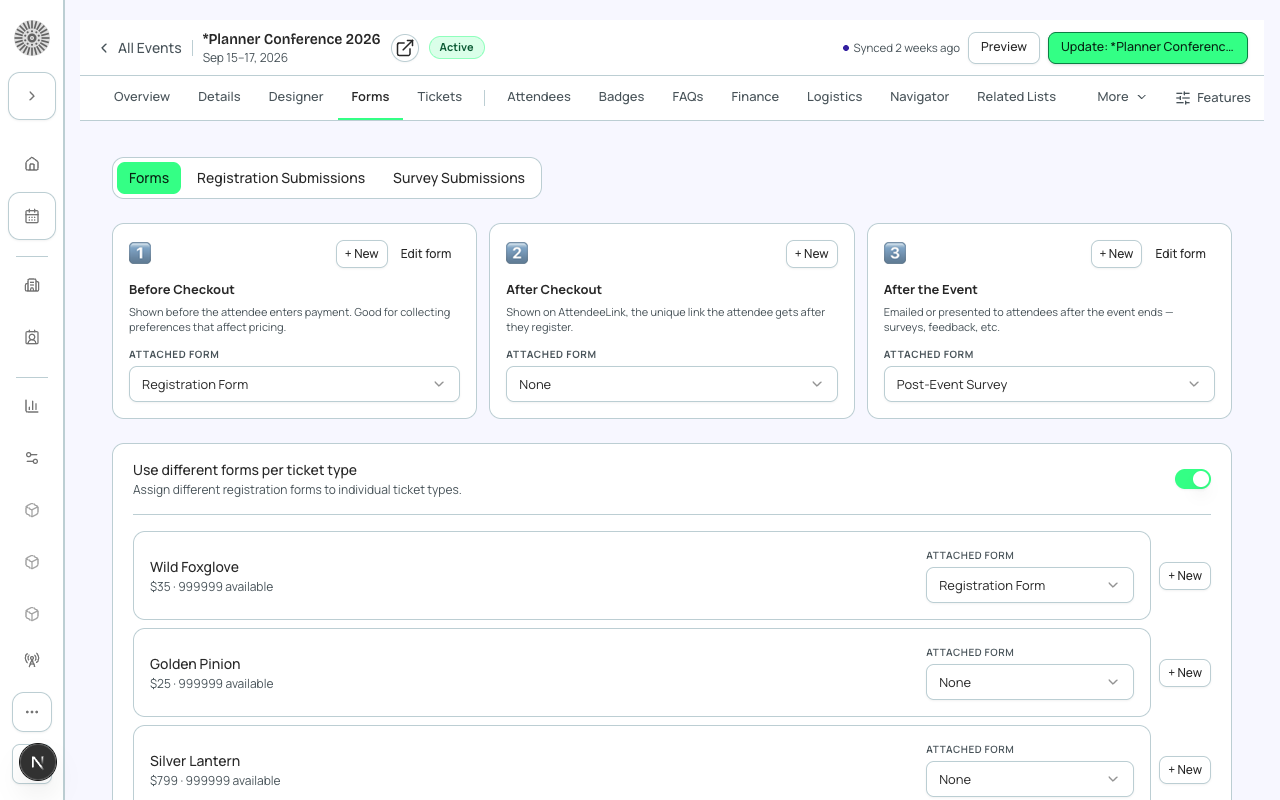
- Registration Form — shown during the checkout flow, before payment. Attached to an event or ticket. Every form has a type: when you create a form from the Forms page or the event wizard, choose Pre-registration, Post-registration or Survey. On an event's Forms tab, a ticket's form is added to the event's form, so attendees with that ticket answer both. If the same form is both, checkout asks its questions once and the Forms tab shows a notice.
- Post-Registration Form — shown immediately after checkout completes, distinct from the pre-registration form above.
- Session Enrollment Form — shown when a registrant selects a session. Session forms appear in checkout only when the event's public page shows Sessions; the Forms tab warns you when Sessions are hidden.
- Survey Form — can be sent post-event via a link; not shown during checkout.
Form answers are never stored in Forge's Postgres
Forge Forms follow a strict PII boundary: registrant answers are written directly to Salesforce and are never persisted in Forge's own database. This means Forge cannot display historical form answers from its own storage — it always fetches them from Salesforce. Do not build integrations that assume Forge stores form responses.
Cloning forms
You can clone a form to reuse it across multiple events. Cloning creates new conference360__Form__c and conference360__Form_Element__c records in Salesforce. Edits to the clone do not affect the original.
To copy a single question, use Duplicate with conditionals on its card. The copy appears right below the original, keeps its conditions, and your unsaved edits to other questions are kept. Clicking Create form twice quickly creates only one form. Deleting a question removes it from Salesforce only when you save, and a live form asks you to confirm first and lists the questions it will delete. Cancel puts them back. When a question has two or more show-when rules, choose whether all of them or any of them must match. Phone is now a plain Text question, and consent is a Checkbox. If a form fails to load, the builder shows a retry banner instead of an empty form, so nothing is overwritten.
Visibility rules
Forge Forms support conditional logic: show or hide a question based on the registrant's answer to an earlier question. These rules are stored as conference360__Form_Element_Condition__c records in Salesforce and are evaluated during the registration flow. Saving a form replaces only the rules of the questions it saves, so rules on questions added elsewhere are kept. At checkout, a conditional question appears right after the question that controls it, and answers to hidden questions are not submitted. Long-text questions show a character counter that follows the question's character limit, a question's hint appears under it, picklist and checkbox defaults are preselected, a required checkbox must be ticked, multi-select questions allow several options, big-list questions suggest matching options as you type and only a picked option is submitted, date questions open a date picker, and divider questions only separate sections. Hidden and URL-parameter questions are never shown: they are filled from the matching parameter in the registration page link.
When you delete a form from the Forms list, the confirmation lists the events it is attached to (up to five, with where it is used). Deleting is still allowed and removes the form from those events.
Open a submission from the list to see each question with its answer value (never the answer record's auto-number). If a link points at a form that does not own that submission, Forge takes you to the correct form automatically.
Form answers write to Salesforce
Every form answer is written to Salesforce — either to the Form Submission record, or to a mapped field when one is configured. Forge uses the conference360__ managed CRUD executor for all server-initiated writes, so your Salesforce field-level security, validation rules, and record-triggered flows all apply to form answer writes.