Beta & Experimental Features
Recurring Events
BetaRecurring Events turns one event into a repeating series. Open Manage > Recurrence on the event you want to repeat (the template), set the repeat pattern and dates, preview the dates as a dry run, then generate the child events in Salesforce. Each child is a linked copy of the template, with the records you choose cloned into it.
Stage: Included in GA
Recurring Events is included in GA and on for every organization.
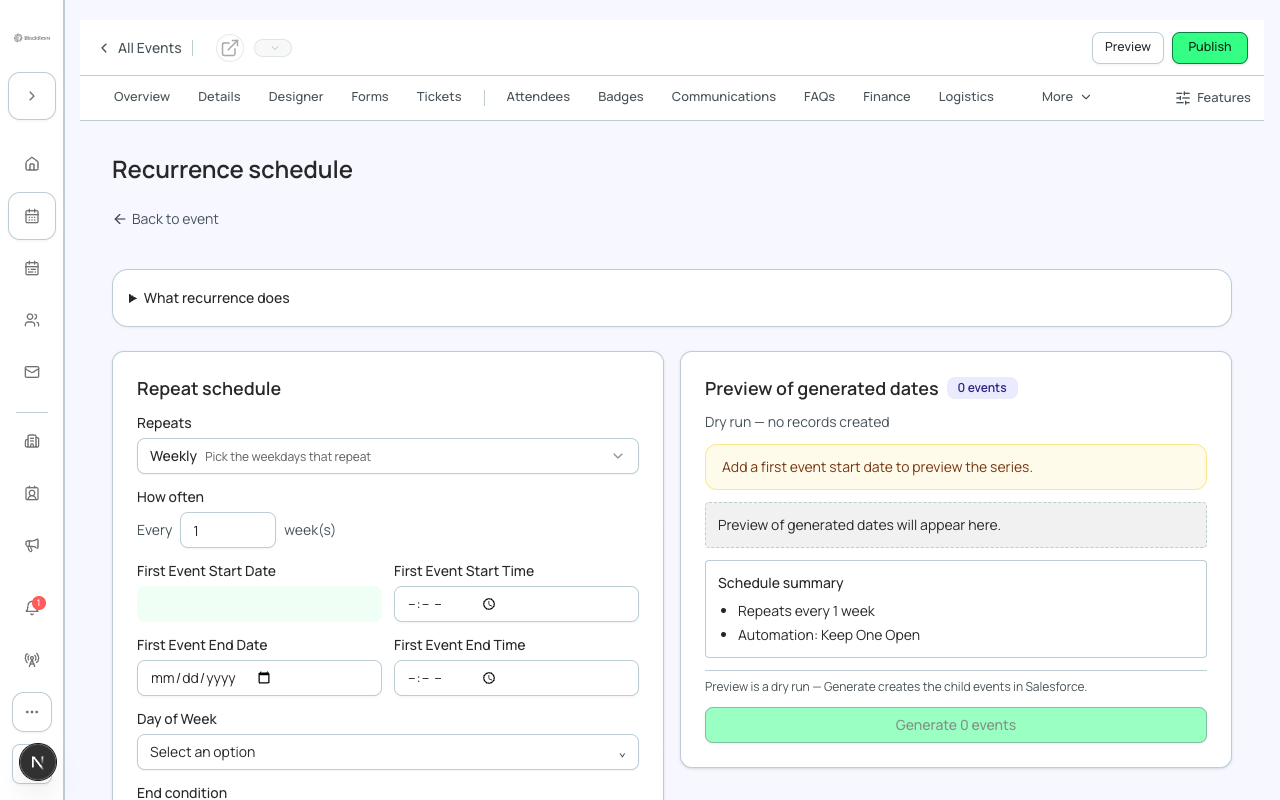
Repeat schedule: what each field does
| Field | What it does | Recommendation |
|---|---|---|
| Pattern | A quick preset: Daily, Every weekday (Mon-Fri), Weekends (Sat & Sun), Weekly, Every 2 weeks, Monthly, Every 2 months, Quarterly, Every 6 months, Annually or Custom. | Pick the closest preset first. Choose Custom only when no preset matches; it opens How often, Every, day and month pickers. |
| How often (Daily, Weekly, Monthly, Yearly) | The unit of repetition used by Custom. Weekly lets you pick the weekdays that repeat; Monthly lets you give exact dates or the first, second, etc. week; Yearly suits ceremonies and renewals. | Use Weekly with weekdays for classes and Monthly with an ordinal week for the first Monday of each month. |
| Every (interval) | How many units between events, for example every 2 weeks or every 45 days. | Leave at 1 unless the gap is larger. |
| Day of Week / Day of Month / Month of Year | Which weekdays, dates or months the events fall on. | If the first event's date is not on a selected weekday you get a warning that the rest of the series repeats on the selected days. Set the first date to match. |
| First event Start Date and Start Time | When the first event starts. Every event in the series starts at this time of day. | Set the real start of your first event. The preview uses the event's time zone. |
| First event End Date and End Time | When the first event ends. Every event keeps the same length and end time. | Required to generate. Keep it on the same day for a one-day event. |
| End condition: Never / On date / After N | Never repeats until you stop it. On date stops on an End date. After N stops after a Number of events. | Prefer On date or After N. Never and any open-ended series generate at most 25 events per save; re-run to extend. |
| Skip dates | Comma-separated dates in YYYY-MM-DD form that are left out of the series. | Use for public holidays or venue closures. |
| Schedule expression (CRON) | An advanced Salesforce schedule expression. Leave empty to use the default schedule from your pattern. | Leave empty unless your Salesforce admin gave you one. An invalid expression is rejected and the schedule is not saved. |
At most 25 events are generated in one save. A series longer than 25 needs a second Generate later. Lowering the count afterwards does not delete events that already exist, because they may already have registrations; surplus events stay and a notice tells you how many.
Schedule setup
| Field | What it does | Recommendation |
|---|---|---|
| Event (Template Master) | The event the series is copied from. | Finish and test the template event first; every child copies it. |
| Event Name | Name given to every child event. If empty the template's name is used. | Leave empty to keep the template name, or set it to a series name. |
| Description (Internal) | A note about what this recurring schedule is for. Staff only. | Describe the purpose, such as Weekly onboarding webinar. |
| Status: Draft or Active | Draft is not yet generating events. Active is generating and maintaining events on schedule. | Use Draft while you adjust the pattern, then Active when you are ready. |
| Recurrence Method: Keep one open / Auto-renew full series / Fixed series | Whether Forge keeps creating events for you. Keep one open always has the next event ready. Auto-renew generates a new batch when the final event completes. Fixed series creates the requested set once with no automation. | Use Fixed series for a known run, such as 8 weekly sessions. Use Keep one open for open-ended programs. |
Automation setup
Keep one open and Auto-renew need a one-time setup step in Salesforce. If it has not been done you see a message asking your admin to open Blackthorn Events Admin and choose Schedule Recommended Jobs. Forge is building native automation, which is not yet available. Fixed series needs no setup.
Clone into each occurrence
Choose which records copy into every generated event. Expand a type to pick individual records, with Select all and Deselect all per type.
| Type | What copies |
|---|---|
| Event Items | Tickets and other items. |
| Sessions | Sessions. Any session that no longer fits the new schedule is skipped and listed. |
| Budget And Expenses | Budget lines and expenses. |
| Event FAQ, Event Content, Event Keywords, Custom Event Tab | Public-page content and tabs. |
| Speaker, Sponsor, Track, Table | People and layout records tied to the event. |
Clone safeguards prevent duplicate sponsors and forms when clone-related is on. Turn it off if each occurrence should be fully fresh.
Preview, generate and confirm
- Fill in the schedule, then choose Preview schedule. The preview lists numbered start and end dates and shows a count badge. It is a dry run: nothing is created.
- Choose Generate N events. A series of more than 10 events asks you to confirm and shows the estimated Salesforce API calls (about 15 per event).
- Watch the progress line, for example Generating, occurrence 3 of 12. If it stops part-way you see how many succeeded and can Retry remaining.
- After generating, the page shows Generated events with an Open link for each, and the status of the series (Active series, Inactive or Partial).
Events created without any tickets are left unpublished and the page tells you. Add a ticket, then publish them.
Managing the series afterwards
| Action | What it does | Recommendation |
|---|---|---|
| Edit series / Update N events | Change the schedule and add or update occurrences. | Preview first. Generate again to add newly scheduled dates. |
| Bulk update children | Applies one change to all child events in scope: a Name pattern with tokens date, index and originalName, or a Date shift in days (positive forward, negative back). | Use Dry run first to see each change, then Apply these changes. |
| Bulk delete children | Deletes children in scope. Skip children with registrations and Skip launched events are on by default. | Leave both skips on. Turning them off asks you to confirm that launched events will be deleted. |
| Scope | Future only (starting today or later), All children (includes past), or After a date. | Choose Future only so past events are never touched. |
| Deactivate series | Stops future generation. Events already generated are kept. | Use when a series ends early. |
Bulk delete cannot be undone from Forge. Published events with registrations are deleted too if you turn off the skip.